 WiseBoard
Write once
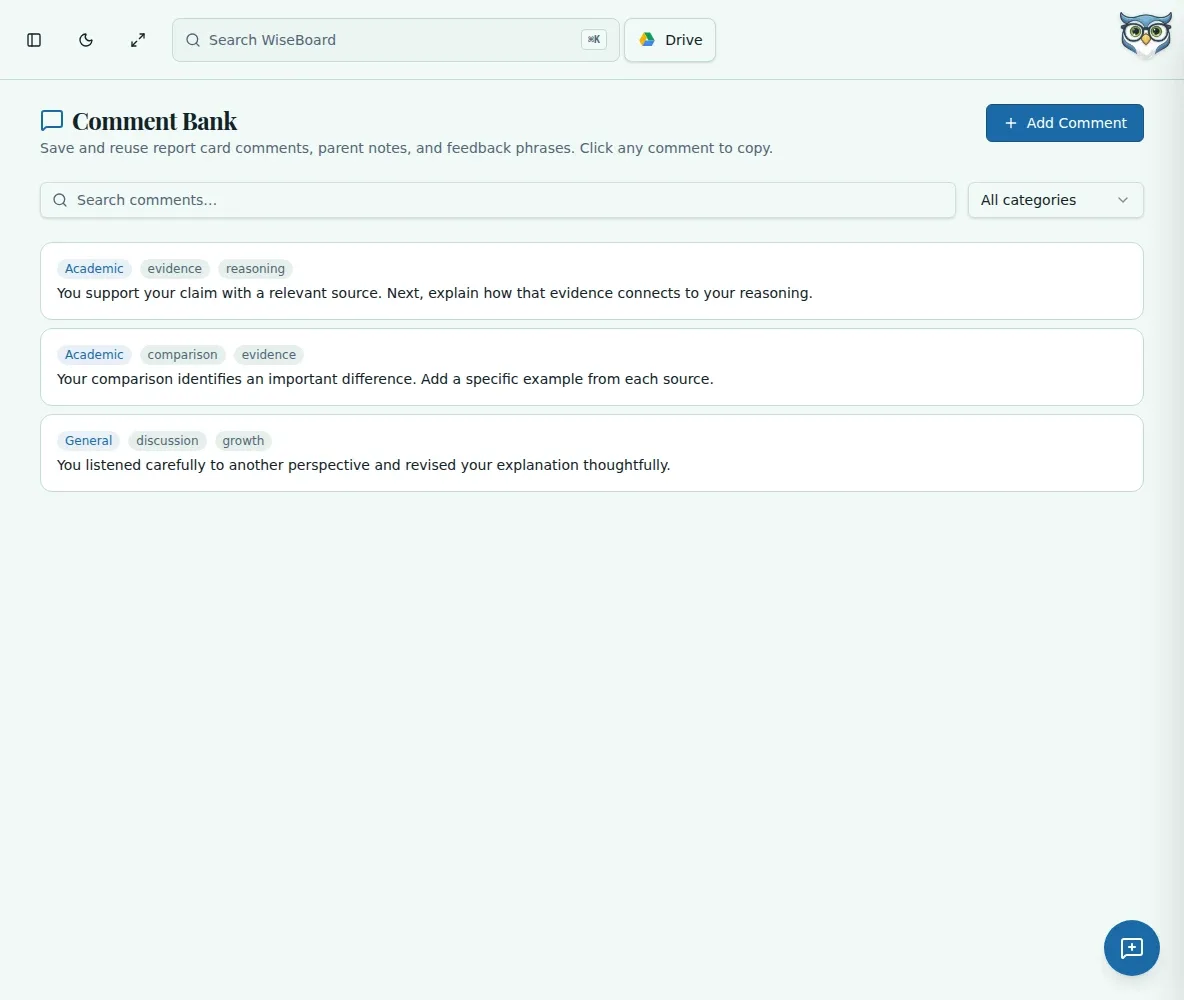
Save thoughtful wording you want to adapt again later.
Everyday teaching
Save your own reusable comments for reports, messages and feedback. Find the right starting point by category or tag, then personalize it before sending.
See the workspace before you sign in.
01 / THE DIFFERENCE
Practical tools that leave the decisions with you.
Save thoughtful wording you want to adapt again later.
Use categories, tags and search to narrow your comment bank.
Copy a comment and adjust it for the student or family receiving it.
02 / IN PRACTICE
A closer look at how this fits into your day.
Explore the interactive app demoWrite the message and organize it with a category or tags.
Filter the bank when a similar situation comes up.
Copy the comment and make it specific before use.
WHAT THIS COULD LOOK LIKE
Start from a saved comment about a student's growing independence, then add a specific example from this term.
GOOD TO KNOW
A little more detail before you dive in.
No. Teachers choose and copy comments for the destination they need.
Yes. Use categories and tags to find them again.
YOUR WORKSPACE AWAITS
Explore WiseBoard on your own terms. Take a look around, or start your free trial.