 WiseBoard
Choose an opener style
Browse available hook types and read each card's title and preview.
Lesson planning
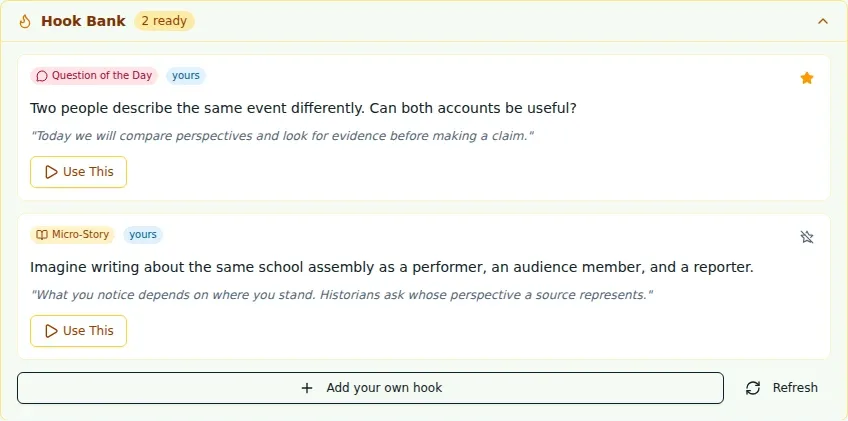
The first few minutes can set a question in motion. Hook Bank surfaces available lesson-opening ideas such as current events, demonstrations, images, unusual facts, micro-stories and questions for the day.
See the workspace before you sign in.
01 / THE DIFFERENCE
Practical tools that leave the decisions with you.
Browse available hook types and read each card's title and preview.
Open a hook to review its introduction and bridge before choosing Use.
Favorite useful hooks or contribute one with its type, intro and bridge.
02 / IN PRACTICE
A closer look at how this fits into your day.
Explore the interactive app demoGo to the lesson in your unit and lesson library.
Find the panel below the lesson plan, then open a card to review its full text or image.
Use an available hook after reviewing it, favorite it or contribute a new one.
WHAT THIS COULD LOOK LIKE
Review the available hook cards for the lesson and choose a prediction question that connects to the upcoming demonstration. Read its full intro and bridge first, then verify any separate live display before projecting.
GOOD TO KNOW
A little more detail before you dive in.
Open a saved lesson and look for the Hook Bank panel below the lesson plan. Feature preferences can hide the panel.
No. Review a hook and use the available action. Verify any separate live display before projecting.
YOUR WORKSPACE AWAITS
Explore WiseBoard on your own terms. Take a look around, or start your free trial.