 WiseBoard
Search by subject
Choose a subject and search its available reference material for a chapter or concept.
Teacher resources
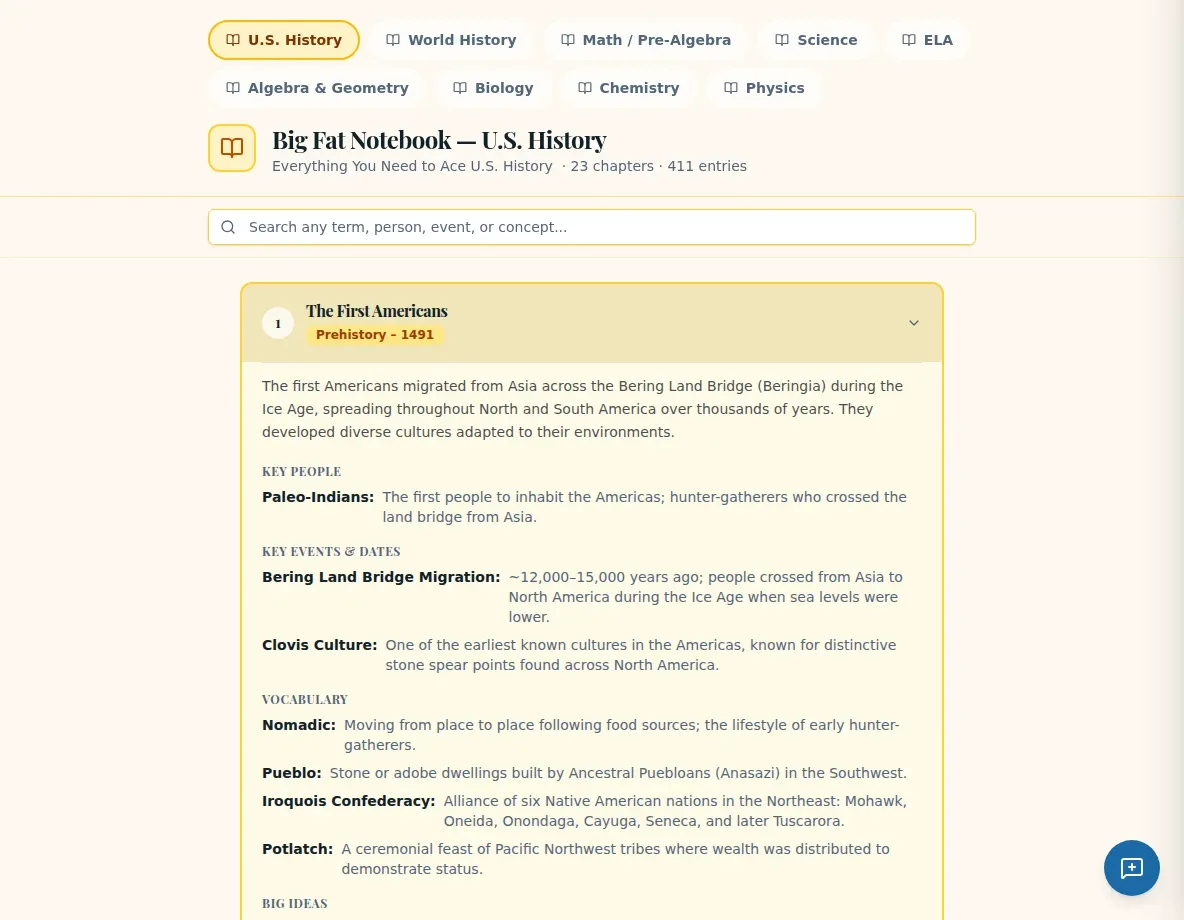
When you need a quick refresher on a subject, Big Fat Notebook offers built-in reference chapters with summaries, terms and key ideas. It is a lookup resource, not a place to write personal notes.
See the workspace before you sign in.
01 / THE DIFFERENCE
Practical tools that leave the decisions with you.
Choose a subject and search its available reference material for a chapter or concept.
Expand a chapter to see its summary, vocabulary and key ideas together.
Use Quick Notes in My Toolbox for your reminders; the Notebook is not a personal note editor.
02 / IN PRACTICE
A closer look at how this fits into your day.
Explore the interactive app demoGo to Resource Library and choose the Big Fat Notebook tab.
Select a subject and search for relevant reference material.
Expand the chapter and use its summary, terms and key ideas as planning context.
WHAT THIS COULD LOOK LIKE
Before introducing a unit on ecosystems, select the relevant subject, search for the chapter and review its key terms. Use the reference to prepare your own lesson notes, then keep personal reminders in Quick Notes rather than expecting them to save in the Notebook.
GOOD TO KNOW
A little more detail before you dive in.
No. It is a searchable built-in subject reference, not a personal note editor. Use Quick Notes in My Toolbox for your own reminders.
Available chapter summaries, vocabulary and key ideas are shown for review.
YOUR WORKSPACE AWAITS
Explore WiseBoard on your own terms. Take a look around, or start your free trial.