 WiseBoard
Capture a reminder in the workspace
Save a short note to your teacher account instead of leaving it in a temporary scratchpad.
Teacher organization
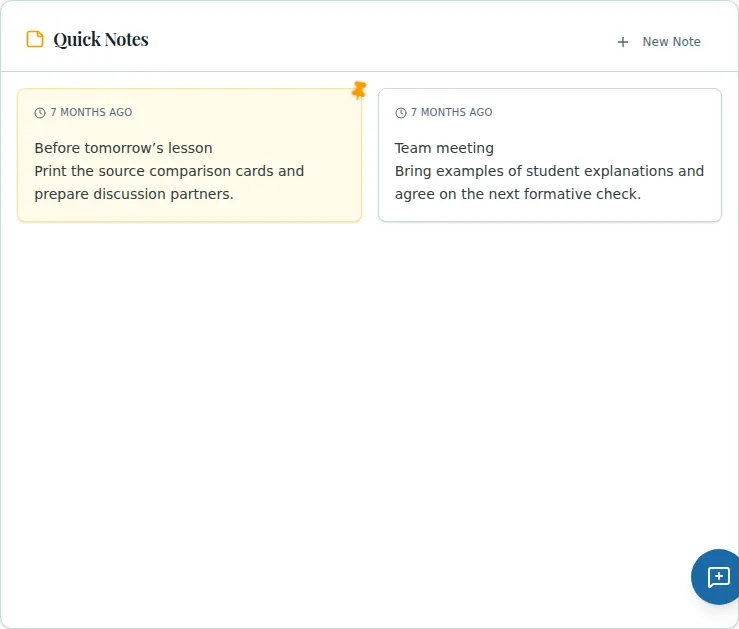
Quick Notes is a simple notepad inside My Toolbox. Write a short reminder, save it to your teacher account, and pin it when you want it above the rest. It is not the place where Pip stores coaching suggestions.
See the workspace before you sign in.
01 / THE DIFFERENCE
Practical tools that leave the decisions with you.
Save a short note to your teacher account instead of leaving it in a temporary scratchpad.
Pinned notes appear above other notes, with newer notes first within each group.
Unpin notes or confirm deletion when a reminder is no longer useful.
02 / IN PRACTICE
A closer look at how this fits into your day.
Explore the interactive app demoFind Quick Notes in My Toolbox and choose New Note.
Type the reminder, choose Save Note, and use the pin control to change its position.
Use the trash control and confirm the prompt to delete a note.
WHAT THIS COULD LOOK LIKE
Save a note to check the class supply bins before the next lab, then pin it until the task is done. Delete it after you have completed the reminder.
GOOD TO KNOW
A little more detail before you dive in.
Quick Notes supports creating, pinning, unpinning, and deleting notes. It does not offer note editing, tags, or search.
No. Quick Notes is separate from Pip coaching history and does not automatically save Pip responses.
YOUR WORKSPACE AWAITS
Explore WiseBoard on your own terms. Take a look around, or start your free trial.