 WiseBoard
Explore supported formats
Review generated variants and the labels for formats that were skipped.
Assessment tools
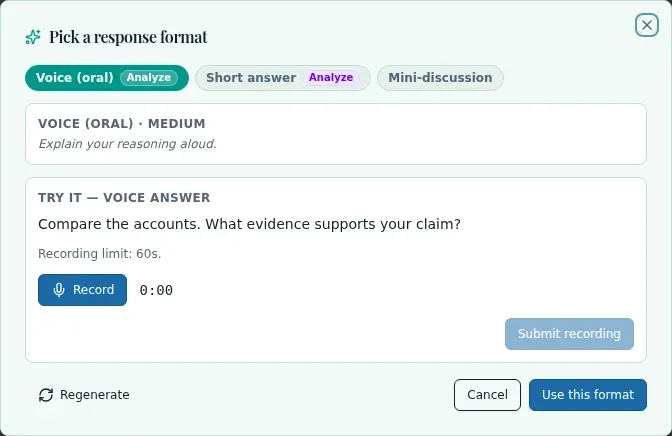
A written response is not always the clearest window into a student's thinking. The exit-ticket format picker requests available question variants so you can review another response format before passing it to the composer.
See the workspace before you sign in.
01 / THE DIFFERENCE
Practical tools that leave the decisions with you.
Review generated variants and the labels for formats that were skipped.
Inspect oral or sketch previews when those formats are returned.
Push a selected format to the composer yourself; variants are not automatically published to a question bank.
02 / IN PRACTICE
A closer look at how this fits into your day.
Explore the interactive app demoGo to the lesson's exit-ticket section and open its format picker.
Inspect available formats and any skipped labels; regenerate if the options need another attempt.
Choose Push this format to send the selected variant to the composer for review.
WHAT THIS COULD LOOK LIKE
For a lesson on a historical turning point, review whether a drag-to-rank variant asks students to sequence causes meaningfully. Pass it to the composer, inspect the wording and answer expectations, then decide whether it suits the exit ticket.
GOOD TO KNOW
A little more detail before you dive in.
No. Review the available variants and any skipped-format labels. Availability depends on what generation returns.
No. Push this format passes the selected variant to the composer; it does not automatically publish a question bank.
YOUR WORKSPACE AWAITS
Explore WiseBoard on your own terms. Take a look around, or start your free trial.