 WiseBoard
Get past the empty first slide
Start from a structured outline with titles, teaching points, and discussion prompts.
Lesson preparation
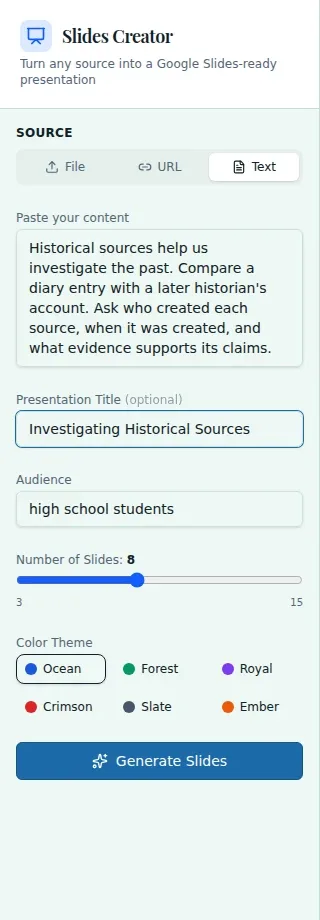
Give Slides Creator a file, URL, or text source, then set an optional title, audience, slide count, and theme. It produces an outline for teacher review and editing. Download a PowerPoint after review; Google Slides export depends on a supported connected account and an available export control.
See the workspace before you sign in.
01 / THE DIFFERENCE
Practical tools that leave the decisions with you.
Start from a structured outline with titles, teaching points, and discussion prompts.
Use a provided source and audience context to shape the draft for your class.
Edit each slide and choose an available download or export route after checking the content.
02 / IN PRACTICE
A closer look at how this fits into your day.
Explore the interactive app demoProvide a file, URL, or text, then set any title, audience, slide-count, or theme options.
Create the outline and review each slide's content against the lesson.
Download a .pptx, or use Google Slides export if the connected account and control are available.
WHAT THIS COULD LOOK LIKE
Provide a short source reading and set the audience and slide count. Review the outline for accurate vocabulary, add a local example students know, and download the revised PowerPoint for class.
GOOD TO KNOW
A little more detail before you dive in.
Google Slides export requires a supported connected account and an available export control. Downloading a PowerPoint is also supported.
No. Review and edit every slide so the sequence, details, and language match your lesson.
YOUR WORKSPACE AWAITS
Explore WiseBoard on your own terms. Take a look around, or start your free trial.