 WiseBoard
Break down the standard's demand
Review draft goals and success criteria alongside the code and original standard language.
Curriculum alignment
Enter a standard code and, when useful, its full text to draft learning goals, prerequisites, vocabulary, misconceptions, and success criteria. Compare every result with the actual standard before turning a student-facing goal into classroom language.
See the workspace before you sign in.
01 / THE DIFFERENCE
Practical tools that leave the decisions with you.
Review draft goals and success criteria alongside the code and original standard language.
Check suggested prerequisites and vocabulary as you plan the learning sequence.
Use draft misconception prompts to prepare examples and checks for understanding.
02 / IN PRACTICE
A closer look at how this fits into your day.
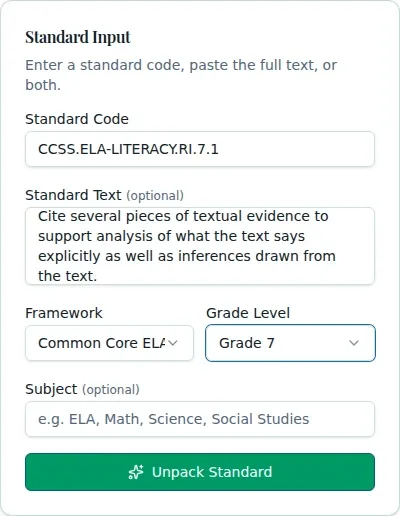
Explore the interactive app demoEnter its code and optional full text, then choose the framework, grade, and useful subject context.
Choose Unpack and compare the output with the actual standard language.
Review goals, prerequisites, vocabulary, misconceptions, and success criteria before planning or posting.
WHAT THIS COULD LOOK LIKE
Enter the standard code and its full text, select the framework and grade, then review the draft I can statement. Adjust its vocabulary and success criteria to match the actual performance students will demonstrate.
GOOD TO KNOW
A little more detail before you dive in.
No. Compare the result to the actual standard and adapt student-facing language to the lesson.
The text is optional, but adding it can give you source language to compare with the draft.
YOUR WORKSPACE AWAITS
Explore WiseBoard on your own terms. Take a look around, or start your free trial.