 WiseBoard
Keep course details with its units
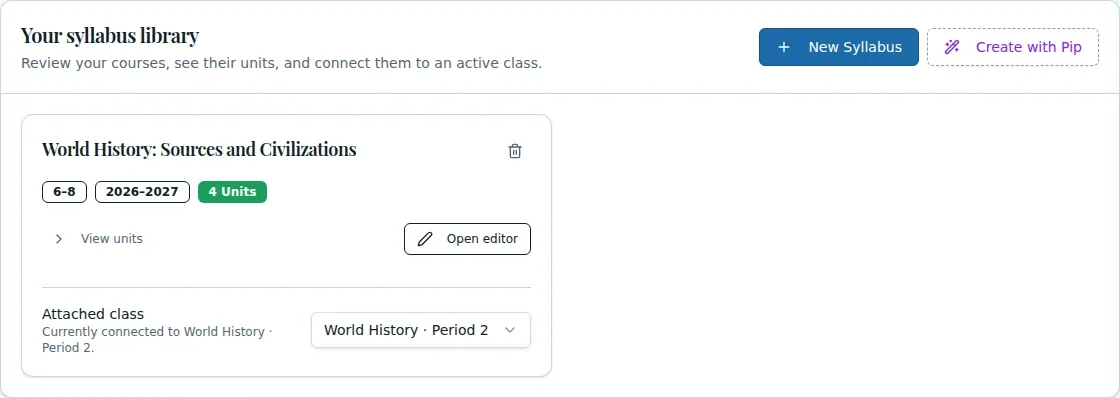
Store the course name, school year, grade, and selected subject units together.
Course planning
Use Syllabus Builder to create or revisit a course syllabus, save its basic details, and choose and order the units you want to include. You can also use Create with Pip from course materials or a pacing guide, then review the generated organization and content.
See the workspace before you sign in.
01 / THE DIFFERENCE
Practical tools that leave the decisions with you.
Store the course name, school year, grade, and selected subject units together.
Select and reorder units to match the course you are planning.
Set up a syllabus yourself or use Create with Pip and review the resulting course structure.
02 / IN PRACTICE
A closer look at how this fits into your day.
Explore the interactive app demoChoose a saved syllabus or enter a course name, year, and grade for a new one.
Save the course details, select and reorder units, then save and return to the class.
If you use Create with Pip, check the created subject, units, lessons, and syllabus organization.
WHAT THIS COULD LOOK LIKE
Create a syllabus for the course and year, select the units you plan to teach, and move them into the intended sequence. If starting from materials with Pip, inspect the generated lessons and organization before using it as your course plan.
GOOD TO KNOW
A little more detail before you dive in.
No. Syllabus Builder organizes saved course syllabi and units. Syllabus Doc Editor is a separate document-editing workflow.
It creates a subject, units, lessons, and a syllabus from the supplied source. Review the generated content and organization before using it.
YOUR WORKSPACE AWAITS
Explore WiseBoard on your own terms. Take a look around, or start your free trial.