 WiseBoard
Choose a source that fits the task
Paste text or fetch a public article URL for the rewrite.
Reading support
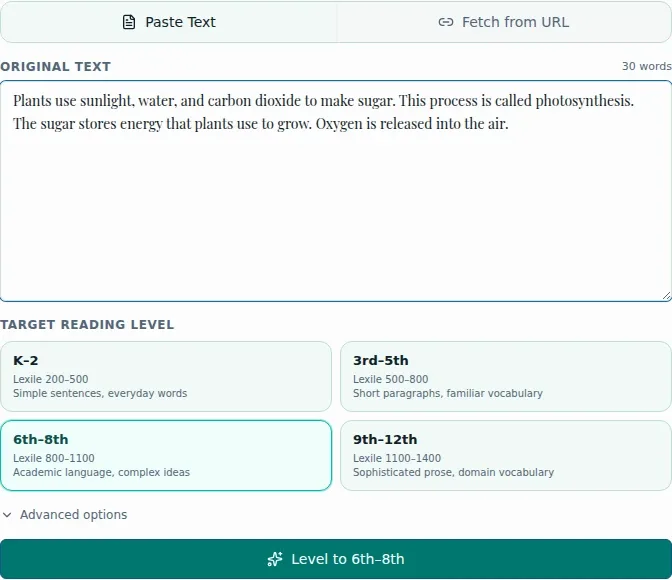
Use pasted text or a public article URL to draft a rewrite for one selected target band. Preserve selected vocabulary or request an optional Spanish version, then compare the output with the source before copying or saving it to a lesson.
See the workspace before you sign in.
01 / THE DIFFERENCE
Practical tools that leave the decisions with you.
Paste text or fetch a public article URL for the rewrite.
Use Advanced options to list vocabulary to preserve or request a Spanish version.
Check meaning and suitability against the source; displayed Lexile ranges are guidance, not a measurement of the result.
02 / IN PRACTICE
A closer look at how this fits into your day.
Explore the interactive app demoChoose Paste Text or Fetch from URL and add the text or public article.
Choose one target band and, if useful, add preserved vocabulary or request Spanish.
Compare the result with the source, then copy it or save it to the intended lesson.
WHAT THIS COULD LOOK LIKE
Fetch an article your class is permitted to use, select a target band, and preserve the unit's key terms. Compare the rewrite with the original for accurate science content before saving it to the lesson.
GOOD TO KNOW
A little more detail before you dive in.
No. They are target guidance, not a certified measurement of the output.
Yes. Use Save to Lesson after review, choose the intended lesson in the dialog, and confirm saving.
YOUR WORKSPACE AWAITS
Explore WiseBoard on your own terms. Take a look around, or start your free trial.